Edge: Deploy Node
The Edge: Deploy Node schedules deployment of one or more edge workflow versions to edge compute devices, or schedules their removal.
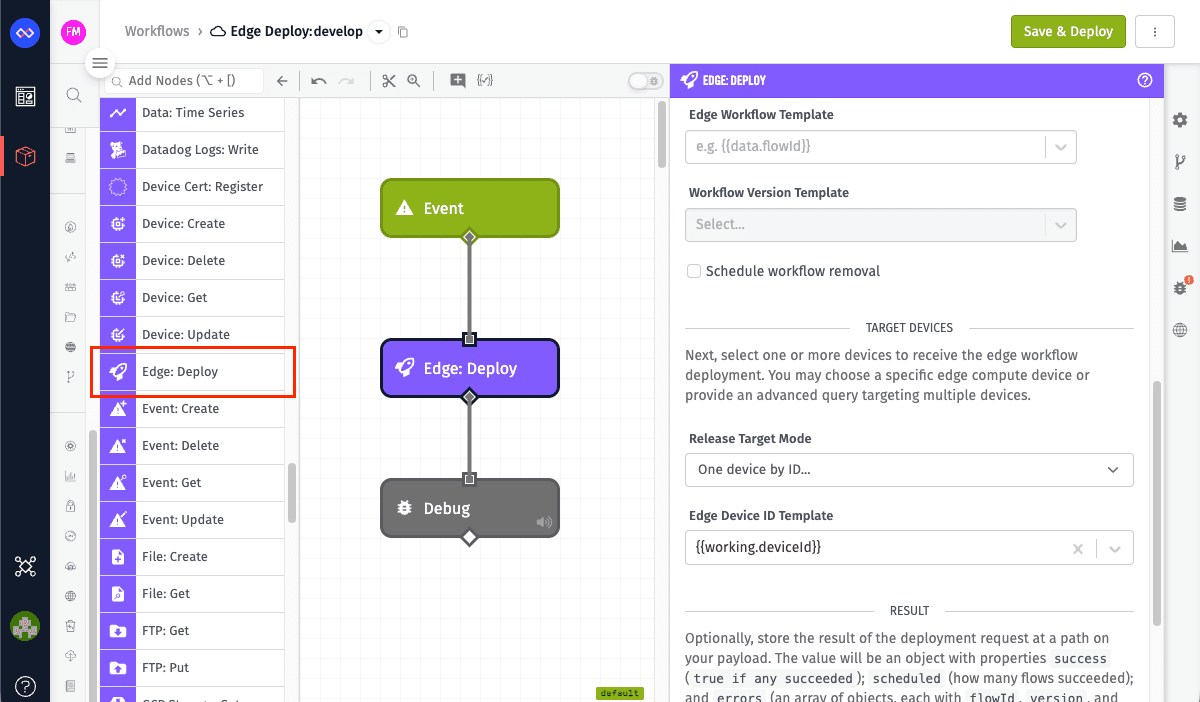
Node Properties
Workflows
Using the Data Method dropdown, choose one or more workflows and versions to deploy:
-
Individual Fields: Define each workflow deployment in repeatable rows with an Edge Workflow Template (a templatable workflow ID) and a Workflow Version Template (a templatable version name). Set the version to
defaultto deploy the workflow's "default" version instead of a specific version name. Check the Schedule workflow removal checkbox to schedule removal instead of deployment. -
Payload Path: Provide a payload path pointing to an object or array of objects. Each object must have a
flowIdproperty (workflow ID) and aversionproperty (version name). Setversiontonullto schedule removal. -
JSON Template: Provide a JSON template string that resolves to an object or array of objects with
flowIdandversionproperties. Setversiontonullto schedule removal.
Example JSON structure for Payload Path or JSON Template methods:
[
  { "flowId": "aaaabbbbccccddddeeeeffff", "version": "v1.0.0" },
  { "flowId": "111122223333444455556666", "version": "v1.4.3" },
  { "flowId": "999988887777666655554444", "version": null }
]
The third entry sets version to null, which schedules removal of workflow 999988887777666655554444 instead of deployment.
Validation
- 1–25 workflow entries per execution.
- A unique
flowIdper execution. - No
developversion for deployment. - A missing or empty
versionis an error. - A
versionexplicitly set tonullschedules removal instead of deployment.
Target Devices
Choose a target mode from the Release Target Mode dropdown:
-
One device by ID...: Provide a templatable device ID in the Edge Device ID Template field (for example,
{{data.edgeDeviceId}}). -
Multiple devices by query...: Provide a templatable advanced query in the Device Query Template field. Matches are always filtered to edge compute devices server-side — devices of other classes matched by the query are ignored, not treated as errors. All matching edge compute devices receive the deployment(s).
Result
Optionally provide a payload path in the Result Path field to store the result. The result is an object with the following structure:
{
  "success": true,
  "scheduled": 2,
  "errors": []
}
- success:
trueif all deployments succeed,falseotherwise. - scheduled: The number of workflow deployments successfully scheduled.
- errors: An array of error objects, one per failed deployment, each containing
flowId,version, and anerrorobject withtypeandmessage.
If one deployment fails, the node continues processing and reports partial success in the result.
Node Example
Suppose the Edge: Deploy Node uses Individual Fields to deploy workflow aaaabbbbccccddddeeeeffff version v1.2.0 to multiple devices. The Release Target Mode is Multiple devices by query... with the following query:
{
  "tags": {
    "site": { "$eq": "{{data.body.site}}" }
  }
}
This query matches devices tagged with site equal to the templated value {{data.body.site}}. Results are automatically filtered to edge compute devices. The Result Path is data.deployResult.
With the incoming payload:
{
  "data": {
    "body": {
      "site": "chicago"
    }
  }
}
The query matches three edge compute devices tagged with site: chicago. Upon successful execution, the node schedules the workflow for deployment to all three devices. The resulting payload is:
{
  "data": {
    "body": {
      "site": "chicago"
    },
    "deployResult": {
      "success": true,
      "scheduled": 1,
      "errors": []
    }
  }
}
Note: scheduled counts workflow entries processed, not devices targeted. A single workflow entry deployed to many devices via query counts as one scheduled deployment.
Node Errors
The Edge: Deploy Node handles errors in two ways:
Validation Errors
The following errors stop execution and write no result:
- Missing or empty workflow list.
- More than 25 workflow entries.
- Duplicate
flowIdvalues in the same execution. - The
developversion specified for deployment. - Unresolvable or invalid Device ID or Device Query.
Deployment Errors
If one or more deployments fail, the node writes a partial result object. For example, if the second device does not exist:
{
  "data": {
    "deployResult": {
      "success": false,
      "scheduled": 1,
      "errors": [
        {
          "flowId": "111122223333444455556666",
          "version": "v1.4.3",
          "error": {
            "type": "NotFound",
            "message": "Device was not found"
          }
        }
      ]
    }
  }
}
The first workflow deployed successfully, but the second failed because the device does not exist.
Related Docs
Was this page helpful?
Still looking for help? You can also search the Losant Forums or submit your question there.