File: Create Node
The File: Create Node allows a workflow to create a file within your Application Files.
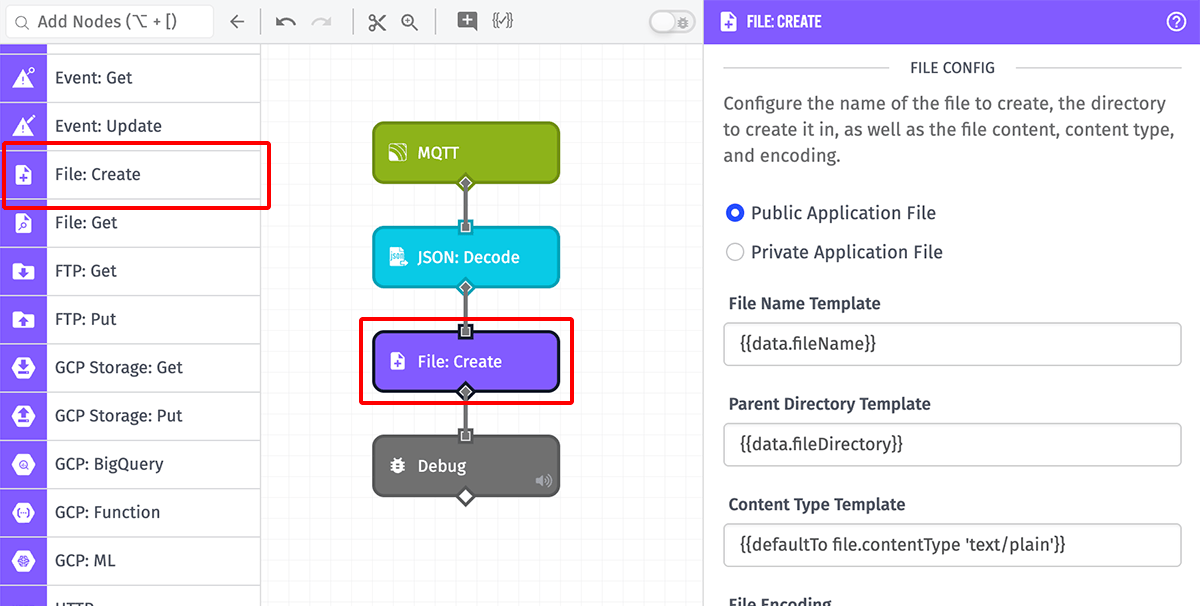
Node Properties
The following sections describe each configuration option for the File: Create Node.
File Configuration
First is to configure the details of the file to create. All applicable fields are templatable unless otherwise noted:
- Public vs. Private File: (Required) Choose whether to create a public application file or a private application file. This field is not templatable.
- File Name Template: (Required) The name of the file to create or update. The file name may not contain a slash (
/). - Parent Directory Template: (Optional) The full path in which to create the file. If any of the specified directories do not already exist, they will be created.
- Content Type Template: (Optional) The MIME type of the file to create. If left blank, the MIME type will be guessed based on the file name.
- File Encoding: (Optional) The encoding of the file contents, by default this is
UTF-8. The following are valid encodings:ASCII,UTF-8,UTF-16LE,Base64,Binary,Hex. This field is not templatable.
File Contents
Next, choose how to provide the contents of the file to create. You have two options ...
- File Content Template: (Default) When selected, enter the content of the file to create as a string template.
- File URL Template: When selected, provide a public URL from which to download the contents of the file to create. The field supports string templates, and it must resolve to a valid URL that can be reached through an HTTP GET request.
Existing File Behavior
If your application already contains the file specified above, you can handle that in one of two ways:
- Cancel and return an error if the file exists: (Default) This option will return an error on the payload and not write any content to the configured file.
- Overwrite the file with my new content if it exists: This option will completely replace the file with the configured file content.
Result Path
The result of the operation can optionally be placed at the specified payload path. If no Result Path is configured, any errors are silently discarded and the workflow continues. If the operation fails, the result object will contain an error object instead of the normal file metadata.
When creating a Private Application File, an additional option appears:
- Include signed URL to file: (Optional) When checked, a signed download URL is included in the result object placed at the Result Path. Checking this reveals a second field:
- URL TTL Template (Seconds): The number of seconds the signed URL should remain valid.
Node Example
The following is an example of what will be placed on the payload after a successful run of the File: Create Node:
{
  "_type": "file|privateFile",
  "id": "5d5aa5bde697320006842c02",
  "url": "https://files.on.losant.com/5c365aee856/important/business.csv",
  "s3etag": "7553490ea58a9e576a6fd75c2e0dc43f",
  "status": "completed",
  "creationDate": "2019-08-19T13:35:57.763Z",
  "lastUpdated": "2019-08-19T13:35:58.075Z",
  "contentType": "text/csv",
  "fileSize": 32,
  "type": "file",
  "parentDirectory": "/important/",
  "name": "business.csv",
  "authorType": "flow",
  "authorId": "5d56e856005f990006c855bf",
  "applicationId": "5c365aee8565c365aee856aa"
}
Node Errors
A common error is when the node attempts to create a file at a specified path and file name when the file already exists, and the node existing file behavior disallows overwriting an existing file. The following is an example of what would be placed on the payload in such a case:
{
  "error": {
    "message": "File business.csv failed to create or update: File business.csv already exists",
    "type": "FILE_CREATE_ERROR"
  }
}
Related Nodes
Was this page helpful?
Still looking for help? You can also search the Losant Forums or submit your question there.