Kubernetes Node
The Kubernetes Node allows the Gateway Edge Agent to interact with a Kubernetes cluster, whether the agent's container is orchestrated by the cluster or communicating with an external cluster endpoint over the network. This node is only available in Edge Workflows utilizing Gateway Edge Agent version 2.7.0 or higher.
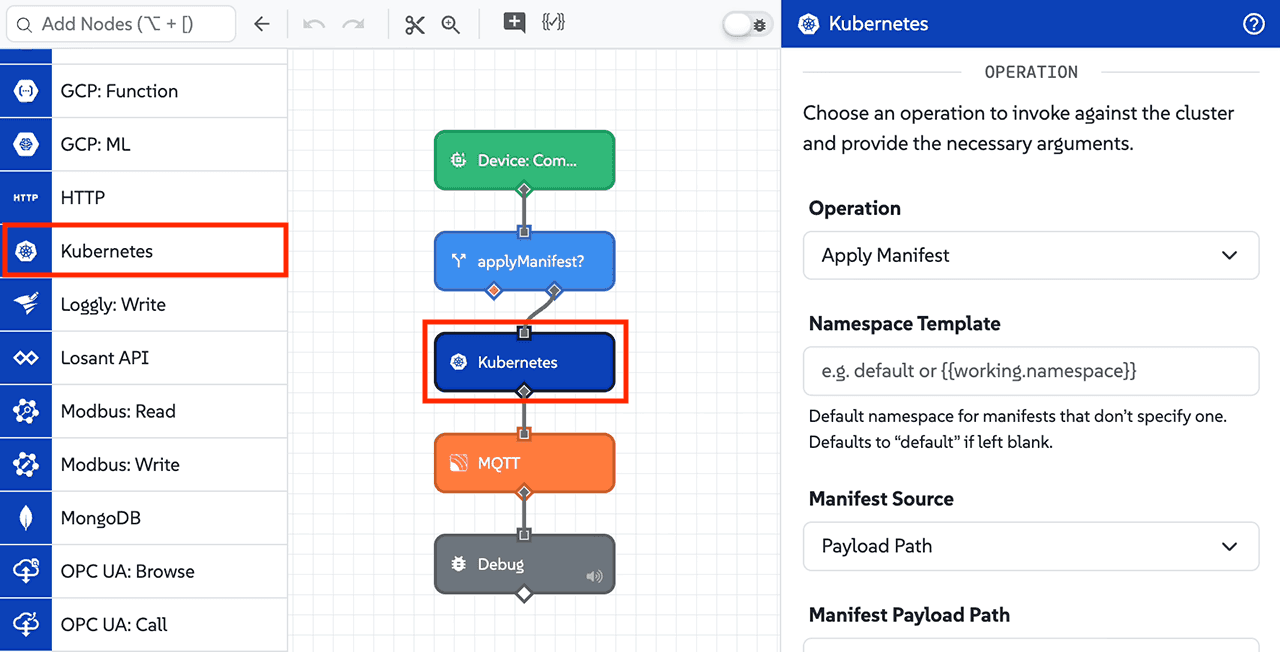
Node Properties
Configuration for the Kubernetes Node is divided into four sections: Authentication, Operation, Result, and Result File.
Authentication
First, select an Authentication Method to choose how to supply the cluster credentials and connection endpoint:
-
Pull From Cluster: (Default) Uses in-cluster service account credentials mounted into the container. When selected, the agent automatically:
- Reads the service account token mounted at
/var/run/secrets/kubernetes.io/serviceaccount/token. - Loads the cluster CA certificate mounted at
/var/run/secrets/kubernetes.io/serviceaccount/ca.crt. - Discovers the control plane API endpoint using standard in-cluster Kubernetes service discovery, falling back to
https://kubernetes.default.svc.
By default, Kubernetes pods run with minimal cluster permissions. To grant the agent permission to inspect or manage cluster resources, you must configure Kubernetes Role-Based Access Control (RBAC). Specifically, create a ServiceAccount, define a
RoleorClusterRolegranting the required API verbs (such asget,list, orpatch) on the target resources, bind it to the ServiceAccount using aRoleBindingorClusterRoleBinding, and assign thatserviceAccountNameto the Gateway Edge Agent pod spec. Without sufficient permissions, the Kubernetes API will return a403 Forbiddenresponse.Note: If the agent cannot read the mounted service account token, a
KubernetesAuthErroris written to the result path. - Reads the service account token mounted at
-
Individual Fields: Supply the connection endpoint, credentials, and TLS settings explicitly:
- Control Plane URL Template: (Required) A string template for the base URL of the Kubernetes API server (for example,
https://kubernetes.default.svcorhttps://192.168.1.10:6443). - Token Source: Select where to obtain the Kubernetes bearer token:
- Direct Input: (Default) Enter the bearer token directly.
- Local File Path Template: Provide a string template resolving to a local file path on the agent's file system containing the bearer token.
- Token Template: (Required when Token Source is Direct Input) A string template resolving to the bearer token (for example,
{{globals.k8sToken}}). - Token File Path Template: (Required when Token Source is Local File Path Template) A string template resolving to the token file path on disk (for example,
/data/k8sToken.txt). - SSL Verification Options:
- Use Default Certificate Authority: (Default) Verifies the cluster TLS certificate against the host system's standard CA store.
- Provide Custom Certificate Authority: Supplies a custom CA certificate to verify cluster certificates.
- Disable SSL Verification: Skips TLS certificate verification. When enabled, custom CA certificates are ignored.
- Certificate Authority Input Method: (Required when SSL Verification Options is Provide Custom Certificate Authority) Choose between:
- Local File Path Template: (Default) Provide a path to the PEM-encoded CA certificate file on the agent's file system.
- Direct Input: Enter the PEM-encoded CA certificate directly.
- Certificate Authority File Path Template: (Required when Certificate Authority Input Method is Local File Path Template) A string template resolving to the path of the PEM-encoded CA certificate file (for example,
/etc/ssl/certs/k8s-ca.crt). - Certificate Authority Template: (Required when Certificate Authority Input Method is Direct Input) A string template or PEM-encoded certificate string.
- Control Plane URL Template: (Required) A string template for the base URL of the Kubernetes API server (for example,
Operation
Choose an operation to invoke against the cluster and provide the necessary arguments. Built-in operations are grouped into the following categories:
- Composite:
- Apply Manifest: Executes a Kubernetes Server-Side Apply against one or more resource documents. Multiple documents are applied in sequence. Direct input accepts YAML documents separated by
---; payload path and file path sources support YAML or JSON.
- Apply Manifest: Executes a Kubernetes Server-Side Apply against one or more resource documents. Multiple documents are applied in sequence. Direct input accepts YAML documents separated by
- Pods:
- List Pods: Lists pods in a specific namespace or across all namespaces.
- Get Pod: Retrieves details for a specific pod.
- Create Pod: Creates a new pod from a JSON definition.
- Delete Pod: Deletes a specific pod.
- Get Pod Logs: Retrieves the raw log output of a pod container as plain text.
- Deployments:
- List Deployments: Lists deployments in a specific namespace or across all namespaces.
- Get Deployment: Retrieves details for a specific deployment.
- Create Deployment: Creates a new deployment from a JSON definition.
- Update Deployment: Replaces an existing deployment (
PUT). - Patch Deployment: Applies a strategic merge patch to an existing deployment (
PATCH). - Delete Deployment: Deletes a specific deployment.
- Services:
- List Services: Lists services in a specific namespace or across all namespaces.
- Get Service: Retrieves details for a specific service.
- Create Service: Creates a new service from a JSON definition.
- Update Service: Replaces an existing service (
PUT). - Patch Service: Applies a strategic merge patch to an existing service (
PATCH). - Delete Service: Deletes a specific service.
- Config Maps:
- List Config Maps: Lists ConfigMaps in a specific namespace or across all namespaces.
- Get Config Map: Retrieves details for a specific ConfigMap.
- Create Config Map: Creates a new ConfigMap from a JSON definition.
- Update Config Map: Replaces an existing ConfigMap (
PUT). - Patch Config Map: Applies a strategic merge patch to an existing ConfigMap (
PATCH). - Delete Config Map: Deletes a specific ConfigMap.
- Namespaces:
- List Namespaces: Lists all namespaces in the cluster.
- Get Namespace: Retrieves details for a specific namespace.
- Nodes:
- List Nodes: Lists all nodes in the cluster.
- Get Node: Retrieves details for a specific node.
- Custom:
- Custom: Invokes an arbitrary REST endpoint on the Kubernetes API. Useful for Custom Resource Definitions (CRDs), unlisted core resources, subresources, or cluster metric endpoints.
Common Fields
Depending on the operation selected, the following fields are available:
- Namespace Template: A string template for the Kubernetes namespace:
- For single-resource operations on namespaced resources (e.g., Get Pod, Create Deployment, Delete Service), this field is required. (Cluster-scoped operations such as Namespaces and Nodes do not require a namespace.)
- For list operations (e.g., List Pods, List Config Maps), this field is optional. Leave blank to query all namespaces in the cluster.
- For Apply Manifest, this field is optional and serves as the default namespace for any namespaced resources in the manifest that do not explicitly define
metadata.namespace. Defaults todefaultif left blank.
- Name Template: (Required for single-resource Get, Delete, Update, Patch, and Get Pod Logs operations) A string template resolving to the name of the target resource.
- Body Template (JSON): (Required for Create, Update, and Patch operations) A JSON template resolving to the resource definition. For Patch operations, this is sent with the
application/strategic-merge-patch+jsoncontent type. - Resource Version Template: (Optional; available for single-resource Get and Delete operations) A string template indicating the resource version constraint for the request (for example,
{{working.k8sResourceVersion}}). When specified on a Get operation, the cluster ensures the retrieved resource meets this constraint. When specified on a Delete operation, the cluster only deletes the resource if its current resource version matches. - Timeout Template (Milliseconds): (Optional) A string template or integer for the request timeout in milliseconds (for example,
30000or{{working.timeout}}). When set on list operations, the value is also converted to seconds and passed as thetimeoutSecondsquery parameter to the Kubernetes API. Defaults to30000milliseconds (30 seconds), or the value of theMAX_EXTERNAL_CALL_TIMEenvironment variable, if set.
List Operation Options
When using any List operation, the following filtering and pagination parameters are available:
- Label Selector Template: (Optional) A string template resolving to a comma-separated list of label requirements. Supports
=,==, and!=operators (for example,environment=production,tier!=frontend). - Field Selector Template: (Optional) A string template resolving to a comma-separated list of field requirements. Supports
=,==, and!=operators (for example,status.phase=Runningormetadata.namespace!=default). - Limit Template: (Optional) A string template resolving to an integer representing the maximum number of items to return. Returns all results if not provided.
- Continue Token Template: (Optional) A string template resolving to a pagination continue token returned by a previous list operation (for example,
{{working.continueToken}}). - Resource Version Template: (Optional) A string template indicating the resource version constraint for the request (for example,
{{working.k8sResourceVersion}}). - Resource Version Match Template: (Optional; available when Resource Version Template is provided) Choose between
ExactorNotOlderThan. Default behavior depends on the provided Limit and Resource Version values. See the Kubernetes documentation for more information.
Pod Logs Options
When using the Get Pod Logs operation, the following fields are available:
- Container Template: (Optional) A string template specifying the container name within a multi-container pod (for example,
{{working.containerName}}). If omitted, the default container is targeted. - Tail Lines Template: (Optional) A string template specifying the number of most recent log lines to retrieve (for example,
100).
Apply Manifest Options
When using the Apply Manifest operation, the following fields are available:
- Manifest Source: Choose how to supply the manifest:
- Direct Input: (Default) Enter the manifest directly into the Manifest Template (YAML) editor. Multiple YAML documents may be included separated by
---. - Payload Path: Enter a payload path in the Manifest Payload Path field pointing to a YAML string, a JSON object, a single resource object, or an array of resource objects.
- Local File Path Template: Enter a string template in the Manifest File Path Template field resolving to a YAML or JSON file on the agent's local file system (for example,
/data/manifests/app.yaml).
- Direct Input: (Default) Enter the manifest directly into the Manifest Template (YAML) editor. Multiple YAML documents may be included separated by
- Field Manager Template: (Optional) A string template for the field manager name used by Kubernetes Server-Side Apply to track field ownership. Defaults to
geaif left blank. - Force-apply over ownership conflicts: (Optional) When checked, passes
force=trueto force-apply changes and take ownership of fields even if another manager owns them.
Supported resource kinds for Apply Manifest include Pod, Deployment, Service, ConfigMap, Namespace, Node, StatefulSet, DaemonSet, ReplicaSet, Secret, ServiceAccount, Job, CronJob, Ingress, PersistentVolumeClaim, Role, RoleBinding, ClusterRole, and ClusterRoleBinding.
The Apply Manifest operation only supports the built-in resource kinds listed above. It cannot be used to apply Custom Resource Definitions (CRDs) or custom resources. To create, update, or interact with CRDs or custom resources, use the Custom operation to send raw HTTP requests directly to their API endpoints.
Custom Operation Options
When using the Custom operation, the following fields are available:
- HTTP Method Template: Select or type an HTTP method (
GET,POST,PUT,PATCH,DELETE). Defaults toGET. - Path Template: (Required) A string template resolving to the API path (for example,
/apis/custom.metrics.k8s.io/v1beta1/namespaces/default/podsor/api/v1/namespaces/{{working.namespace}}/endpoints). Query parameters can be included directly in the path template. - Body JSON Template: (Disabled for
GET) A JSON template resolving to the request payload sent withPOST,PUT, orPATCHrequests (for example,{{working.k8sBody}}).
Result
Finally, you may optionally provide a Result Path, which is a payload path for where to place the result of the operation (for example, working.k8sResult). If omitted, nothing is written to the payload. The shape of the value placed at this path depends on the selected operation.
The object placed at the Result Path contains:
statusCode: The HTTP status code returned by the Kubernetes API (e.g.,200,201,400,404).body: The response data returned by the API (parsed as JSON when applicable, or plain text for pod logs). If a Result File Path Template is configured, this contains the destination file path instead.error: (Optional) An object describing a transport, network, or mid-stream execution error. This property is only present under error conditions.
Note: Non-2xx HTTP responses (such as 404 Not Found or 403 Forbidden) are returned as valid response objects containing statusCode and body rather than throwing workflow runtime errors.
Apply Manifest Result Shape
When applying manifests:
- If the manifest contains a single document,
bodycontains that document's apply result object. - If the manifest contains multiple documents,
bodycontains an array of results for each document applied in order. If an individual document fails with a non-2xx response, subsequent documents continue to be applied, and the overallstatusCodereflects the first error encountered. - If a transport or network error occurs mid-stream while applying multiple documents, earlier successfully applied documents are preserved in
body, and the overall object includes anerrorobject.
Result File
Optionally, provide a Result File Path Template (as a string template) for where to write the result of the operation on disk (for example, /data/k8s/result.json or /data/k8s/logs.txt). When including a file path, the Result Path above receives the status code and the destination file path in place of the response body. If writing the file fails, the Result Path receives only the error, replacing the operation's result.
Note: The file is only written if the Kubernetes operation returns a successful (2xx) response. If the API returns a non-2xx response (such as 404 Not Found or 422 Unprocessable Entity), the file is not written, and the API response body is placed at the Result Path so it can be inspected.
If File Exists
If no file exists at the path specified above, the node writes a new file to disk at that location. Specify below what to do if a file does exist:
- Cancel and return an error if the file exists: Cancels the write and writes an
EEXISTerror to the result path if a file already exists. - Append my content to the file if it exists: Appends the response content to the end of the existing file.
- Overwrite the file with my new content if it exists: (Default) Completely replaces the existing file with the response content.
Node Example
Given a cluster with a pod named nginx-app running in the default namespace, executing the Get Pod operation with the Result Path set to working.k8sResult will place the following object on the payload:
{
  "statusCode": 200,
  "body": {
    "kind": "Pod",
    "apiVersion": "v1",
    "metadata": {
      "name": "nginx-app",
      "namespace": "default",
      "resourceVersion": "104523"
    },
    "status": {
      "phase": "Running",
      "podIP": "10.244.0.15"
    }
  }
}
Node Errors
If an error occurs before or during communication with the Kubernetes cluster (such as an authentication failure or a network timeout), an error object is placed at the Result Path:
{
  "error": {
    "type": "TIMEOUT",
    "message": "timeout of 30000ms exceeded"
  }
}
Possible error type values include:
KubernetesAuthError: The agent failed to read the in-cluster service account token (for example, if the token file is not mounted).TIMEOUT: The request timed out before receiving a response from the API server.ECONNREFUSED/ENOTFOUND: A network or DNS failure prevented connecting to the cluster endpoint.EEXIST: Writing the response to disk failed because the file already exists and the If File Exists behavior was configured to cancel and return an error.
Note: If the request successfully reaches the API server but returns an HTTP error status code (such as 404 Not Found or 403 Forbidden), the response is not considered a node error. Instead, the Result Path receives an object containing the statusCode and the error body returned by the cluster. Authoring or validation errors (such as missing required fields, attempting to navigate outside permitted directories, or providing invalid JSON syntax in a template) will immediately fail execution of the node and halt the workflow.
Was this page helpful?
Still looking for help? You can also search the Losant Forums or submit your question there.