OTel Metrics: Write Node
The OTel Metrics: Write Node writes custom metric values to an OpenTelemetry (OTel) collector running on the same host machine as the Gateway Edge Agent (or accessible over HTTP/HTTPS). This node is only available in Edge Workflows.
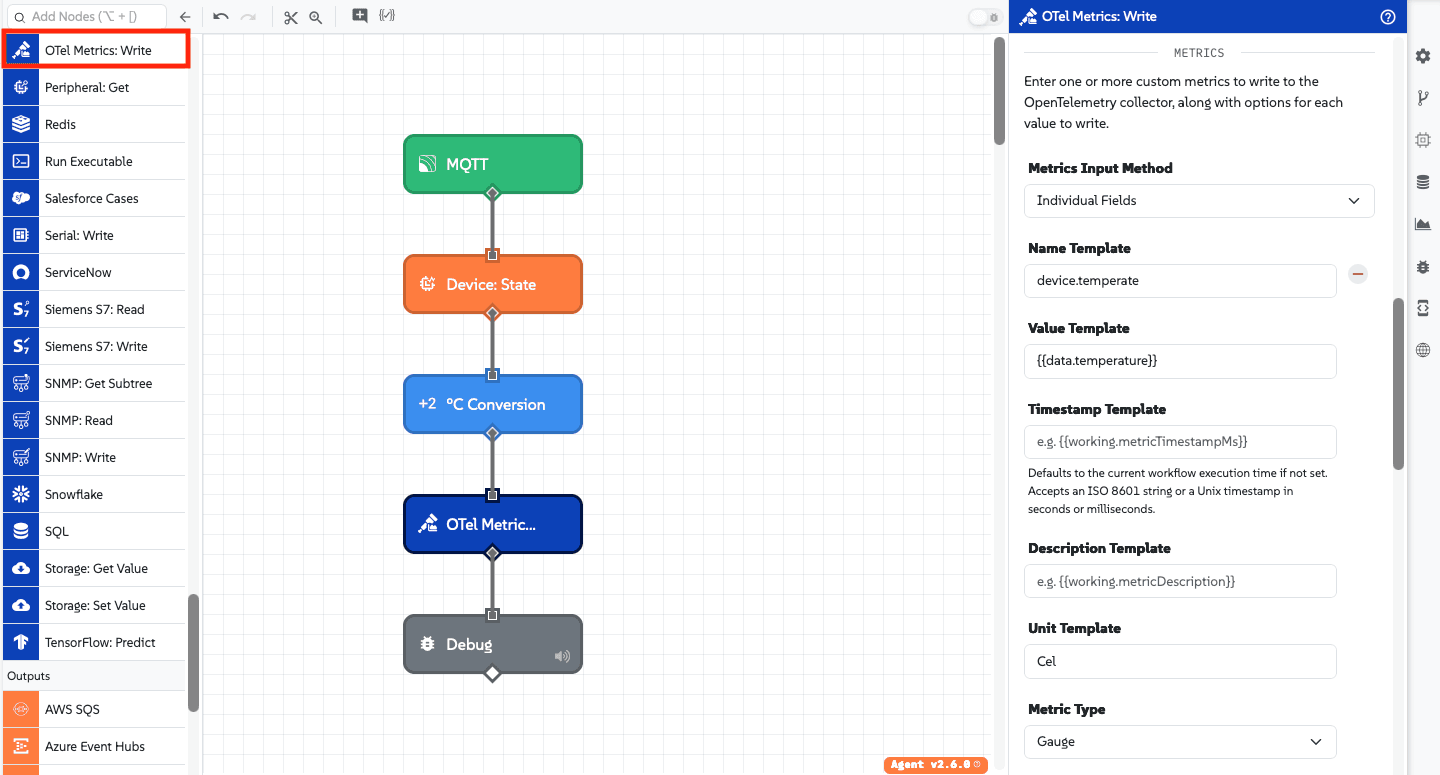
Node Properties
Configuration for the OTel Metrics: Write Node is divided into four main sections: Connection, Resource Config, Metrics, and Result.
Connection
Configure the network location and authentication details for reaching the OpenTelemetry collector over OTLP/HTTP:
- Configuration Type: Select how to supply the collector connection details:
- Individual Fields: (Default) Enter the connection, authorization, and SSL configuration directly on the node.
- Agent Config File: Pull the collector URL, authorization, and TLS configuration from the Edge Agent container's
[otlpCollector]configuration file block. When selected, the inline connection fields below are hidden, but any Resource Attributes defined on this node are still merged on top of the agent configuration.
When Individual Fields is selected, configure the following:
- Collector URL Template: (Required) A string template for the base URL of the OpenTelemetry collector:
- The URL can optionally include a custom port or a path prefix.
- Do not include an OTLP signal path (such as
/v1/metrics,/v1/logs, or/v1/traces), query strings, fragments, or embedded credentials. The node automatically appends/v1/metricswhen transmitting data.
- Authorization Type: Select an authentication method to include with requests sent to the collector:
- None: (Default) No authorization headers are sent.
- Basic: Sends a Basic authorization header. Requires:
- Username Template: (Required) A string template resolving to the username.
- Password Template: (Optional) A string template resolving to the password.
- Bearer Token: Sends a
Bearertoken in the authorization header. Requires:- Bearer Token Template: (Required) A string template resolving to the token.
- Client Certificate: Authenticates using an mTLS client certificate and private key.
- Private Key Input Method: Choose between
Local File Path Template(a file path on the Edge Agent's file system) orDirect Input(paste the PEM-encoded private key or template). - Certificate Input Method: Choose between
Local File Path Template(a file path on the Edge Agent's file system) orDirect Input(paste the PEM-encoded certificate or template).
- Private Key Input Method: Choose between
- SSL Verification Options:
- Use Default Certificate Authority: (Default) Verifies the collector's certificate against standard system CAs.
- Provide Custom Certificate Authority: Allows providing a custom CA certificate to verify self-signed or internal collector certificates. Select between
Local File Path TemplateorDirect Input. - Disable SSL Verification: Disables TLS verification for untrusted or self-signed server certificates. When enabled, any configured custom CA certificate is ignored.
Resource Config
Optionally define the instrumentation scope and resource attributes associated with the emitted metrics.
- Scope Name Template: (Optional) A string template for the instrumentation scope name. Defaults to
gea-otel-writeif not provided. - Scope Name Version Template: (Optional) A string template for the scope version. Defaults to the current Gateway Edge Agent version if not provided.
- Resource Attributes Method: Choose how to define resource-level attributes (for example,
service.nameorhost.name):- Individual Fields: (Default) Define key-value pairs row-by-row. Both key and value support string templates. Integer, float, and boolean values are preserved as their respective OTLP types rather than exported as strings.
- JSON Template: Provide a JSON template that resolves to a flat JSON object of key-value pairs:
{"service.name": "edge-gateway-01","host.name": "{{agent.hostname}}","deployment.environment": "production"}
- Payload Path: Provide a payload path pointing to a flat object containing key-value pairs on the current payload.
Metrics
Define one or more custom metrics to write to the OpenTelemetry collector. First, choose a Metrics Input Method:
Individual Fields
Define each metric individually. At least one metric is required:
- Name Template: (Required) A string template resolving to the OTel metric name.
- Value Template: (Required) A string template resolving to a numeric value for the metric.
- Timestamp Template: (Optional) A Unix timestamp in milliseconds, Unix timestamp in seconds, or ISO 8601 date string. Defaults to the current workflow execution time if not set.
- Description Template: (Optional) A string template describing the metric.
- Unit Template: (Optional) A string template representing the UCUM unit of measurement (for example,
Cel,%, orBy). Defaults to1if omitted. - Metric Type: Select either Gauge (default) or Sum:
- Gauge: Represents a measurement at a given point in time (for example, current temperature).
- Sum: Represents the sum of values over time. Selecting Sum displays additional fields:
- Start Timestamp Template: (Optional) An optional start time for the sum metric. Accepts an ISO 8601 string or a Unix timestamp in seconds or milliseconds. Omitted from the data point if left blank.
- Aggregation Temporality: Choose between
Cumulative(default, OTLP temporality 2) orDelta(OTLP temporality 1). Note that Prometheus-compatible collectors do not support delta aggregation temporality for sums and will reject requests containing them. - Monotonic: (Checkbox, checked by default) When checked, indicates the sum can only increase. Uncheck if the sum may decrease.
- Metric Attributes Method: Define attributes specific to this metric:
- Individual Fields: (Default) Define key-value rows using string templates. Values render typed per OTLP attribute rules.
- JSON Template: A JSON template resolving to a flat JSON object of attribute keys and values:
{"sensor.id": "{{working.sensorId}}","location": "facility-a"}
- Payload Path: A payload path pointing to a flat object of attribute key-value pairs on the payload.
JSON Template
When selected, provide a JSON template resolving to an array of OpenTelemetry metric objects (or a single metric object) matching the OTLP specification:
[
  {
    "name": "device.temperature",
    "description": "Current temperature reading",
    "unit": "Cel",
    "gauge": {
      "dataPoints": [
        {
          "asDouble": {{working.temperature}},
          "timeUnixNano": "{{working.timestampNano}}",
          "attributes": [
            {
              "key": "sensor.id",
              "value": { "stringValue": "{{working.sensorId}}" }
            }
          ]
        }
      ]
    }
  },
  {
    "name": "device.events.total",
    "description": "Total processed events",
    "unit": "1",
    "sum": {
      "dataPoints": [
        {
          "asDouble": {{working.totalCount}},
          "timeUnixNano": "{{working.timestampNano}}",
          "startTimeUnixNano": "{{working.startTimeNano}}",
          "attributes": []
        }
      ],
      "aggregationTemporality": 2,
      "isMonotonic": true
    }
  }
]
Payload Path
When selected, provide a payload path pointing to an array of metric objects (or a single metric object) formatted according to the OTLP specification, as shown in the JSON Template example above.
Result
Optionally, enter a payload path for where to store the result of the write operation.
Node Example
The following is an example of a successful operation:
{
  "success": true,
  "metricCount": 2
}
Node Errors
If the operation failed (for example, collector unreachable or non-200 HTTP response), the object placed at the path will contain an error:
{
  "success": false,
  "error": {
    "type": "OTEL_COLLECTOR_RESPONSE_ERROR",
    "message": "HTTP 500: Internal Server Error"
  }
}
Possible error type values include:
OTEL_COLLECTOR_RESPONSE_ERROR: The collector responded with a non-2xx status code.OTEL_COLLECTOR_REQUEST_ERROR: The collector was unreachable (for example, network failure, connection refused).NodeTimeout: The request timed out before the collector responded.Validation: An invalid host, URL, or certificate file was encountered during the request.
If the collector accepted the request but partially rejected data points (or reported warnings), rejectedDataPoints and rejectedMessage will be included:
{
  "success": true,
  "metricCount": 2,
  "rejectedDataPoints": 1,
  "rejectedMessage": "timestamp too old"
}
Related Nodes
Was this page helpful?
Still looking for help? You can also search the Losant Forums or submit your question there.