Base64: Decode Node
The Base64: Decode Node allows you to decode a Base64 string on the payload and store the result on the payload for later use. The result will be a binary array by default.
This node is only available in Embedded Workflows. If you would like to decode a Base64 string in any of the other workflow classes, you can do so using the {{decodeBase64}} helper.
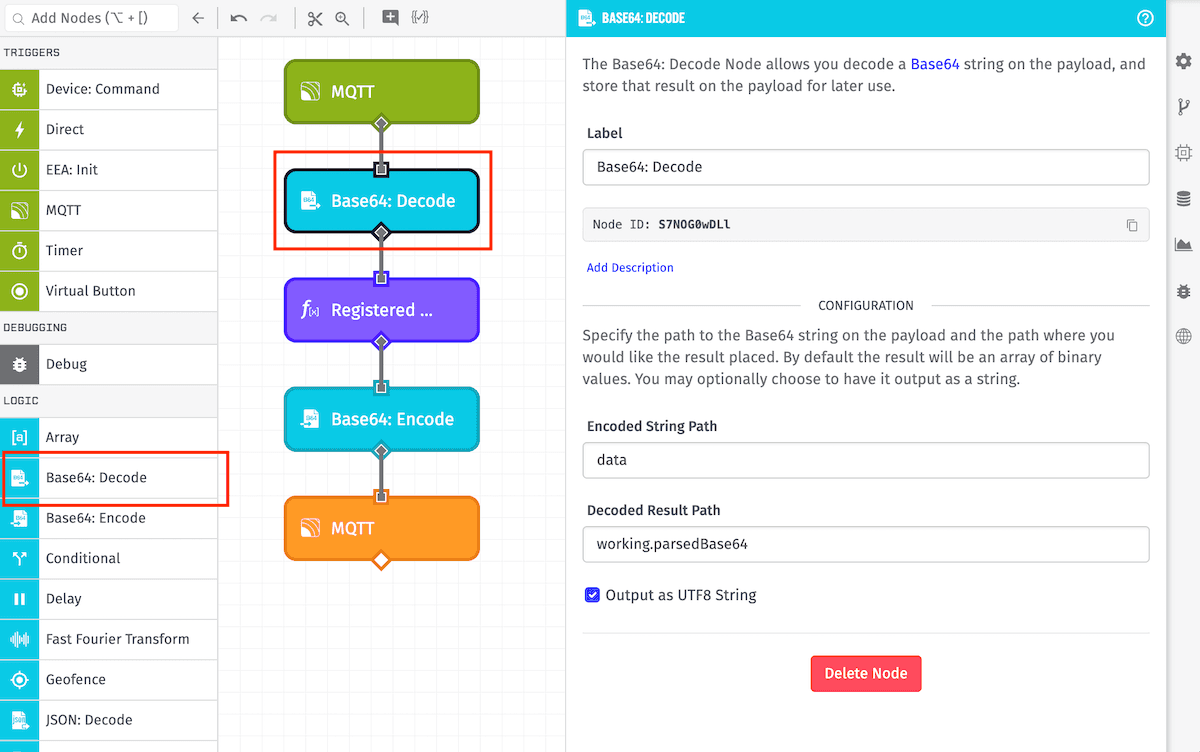
Node Properties
The Base64: Decode Node's configuration has a single section ...
Configuration
Define the data source and the destination for the result:
- Encoded String Path: The payload path to the string to decode.
- Decoded Result Path: The payload path at which to store the result.
- Output as UTF-8 String: Optionally, you may want the result to be a UTF-8 encoded string instead of a binary array.
Node Example
In the above example, the workflow will decode the string at the data path and place the results at the working.parsedBase64 path as a string. So, for example, given the following payload:
{
  "data": "TXkgc3RyaW5n",
  ...
}
The payload after execution of the Base64: Decode Node would look like:
{
  "data": "TXkgc3RyaW5n",
  "working": {
    "parsedBase64": "My string"
  },
  ...
}
Node Errors
If the provided input is not a valid Base64 string, the workflow will halt and error at this node.
Related Nodes
Was this page helpful?
Still looking for help? You can also search the Losant Forums or submit your question there.