Crypto: Sign Node
The Crypto: Sign Node generates an encrypted signature from a given private key and string of data.
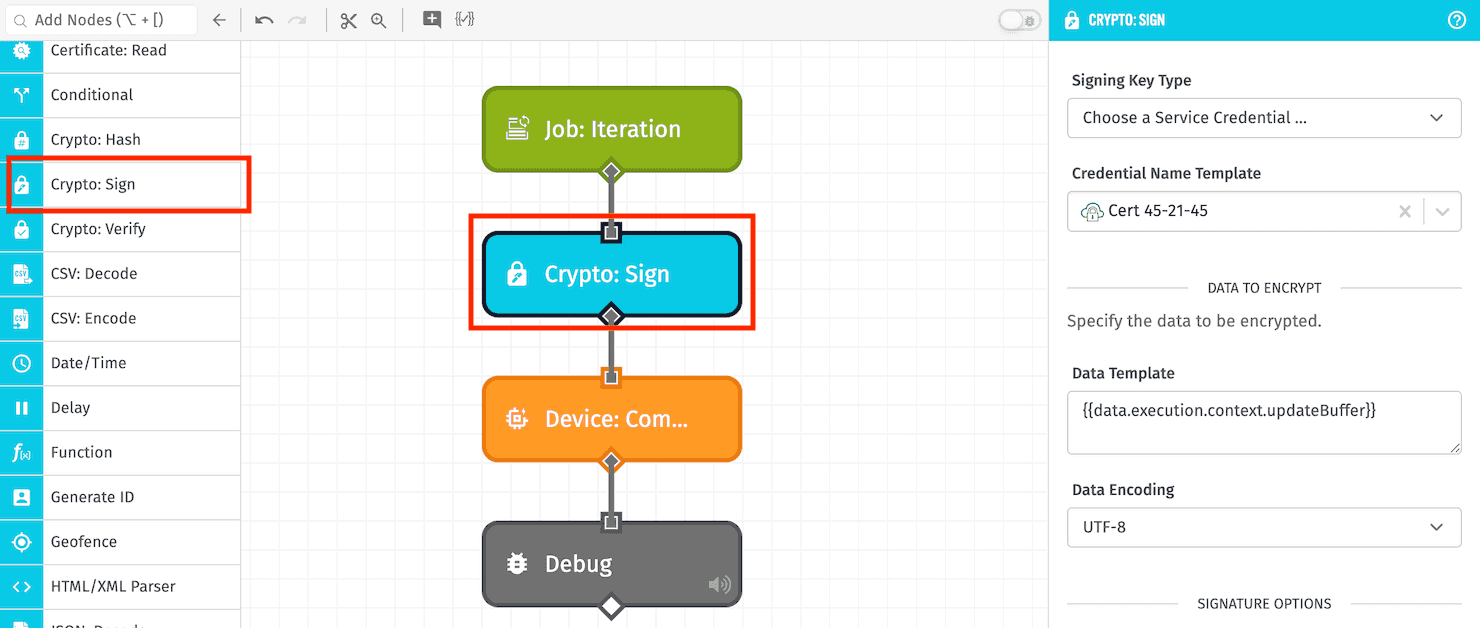
Node Properties
Configuration for the Crypto: Sign Node is broken up into the following sections ...
Configuration
First, choose how to provide the signing key by choosing a Signing Key Type. Options are:
- Credential Name Template: If selected, choose one of your application's Certificate / Key Pair Service Credentials to sign the provided data. This is recommended; however, this option is not available in Edge Workflows.
- Enter Local File Path Template: In Edge Workflows only, you may provide a file path to where the signing key is stored in a volume mounted within the agent's container.
- Enter String Template: If selected, provide a string template resolving to the signing key.
- Enter Payload Path: If selected, provide a payload path pointing to the signing key on the workflow payload.
For all options other than Credential Name Template, the signing key must be a PEM-encoded private key. Encrypted (password-protected) private keys are not supported. Accepted formats are:
- PKCS#8 (
-----BEGIN PRIVATE KEY-----) - PKCS#1 RSA (
-----BEGIN RSA PRIVATE KEY-----) - SEC1 EC (
-----BEGIN EC PRIVATE KEY-----)
Data to Encrypt
Next, define the data to encrypt with your signing key:
- Data Template: Enter a string template for the data you wish to encrypt.
- Data Encoding: Provide the encoding of the provided data. Default is
UTF-8.
Signature Options
Next, specify options for generating the signature:
- Signature Output Encoding: Choose the encoding for the signature output. Default is
Base64. - Algorithm Type: Choose a cryptographic hash algorithm for generating the signature. Default is
SHA-256. - Padding: For the padding, choose either
RSA PKCS1(default) orRSA PSS. - DSA Encoding: For the Digital Signature Algorithm encoding, choose either
DER(default) orIEEE P1363.
Result Path
Finally, specify a Result Path for where to place the generated signature. If successful, the value placed at this payload path will be an object with a signature property. If the node fails, the value will be an error object with a message property giving a reason for the failure.
Node Example
Given a Crypto: Sign Node with the following configuration ...
- Signing Key Type:
Choose a Service Credential ... - Data Template:
{{working.myData}} - Data Encoding:
UTF-8 - Signature Output Encoding:
Base64 - Algorithm Type:
SHA-256 - Padding:
RSA PKCS1 - DSA Encoding:
DER - Result Path:
working.signResult
... and a payload of the following ...
{
  "working": {
    "myData": "Hello, World!"
  }
}
... the following would be placed on the payload at the path of working.signResult:
{
  "signature": "JHtyj3waI+T0F452kJRlmXVxcrZs/UmliXS2yJOWesfKtf46+ewmy1V3N2pIqB71bAB8keyntuiRGlRf6TZitOcVaZ+rnYYptTlio9Bpj/mNQb1l2h8JAM+detBbTUbS6QfRUlnOgN7/wb8Ro8ST7glNIxEb2sa754+X4cLVLA8p2H9Fk0rKOiLMnlFi9/xb9rHh02wWn3xP2fc9ishz/BKZgCmK3TQfRO3b0gv0qMaqiB59EPs0heYcXCW9DgUynDqiier1oVwb48qURIFrW9rBaqvpcEth2PTJ89JxUzefHpJyrpq21fcVKdYsgEseOlhGweTD2Vcxud14UP8u1A=="
}
Node Errors
A common case where the Crypto: Sign Node would return an error would be if you attempted to use a public key - or an otherwise invalid private key - to sign the data. In such a case, the following would be placed on the payload at the Result Path:
{
  "error": {
    "message": "Key is invalid."
  }
}
Related Nodes
Was this page helpful?
Still looking for help? You can also search the Losant Forums or submit your question there.