Fast Fourier Transform Node
The Fast Fourier Transform Node allows for transforming an array of data points from one domain (such as space or time) into a frequency representation using a fast Fourier transform algorithm.
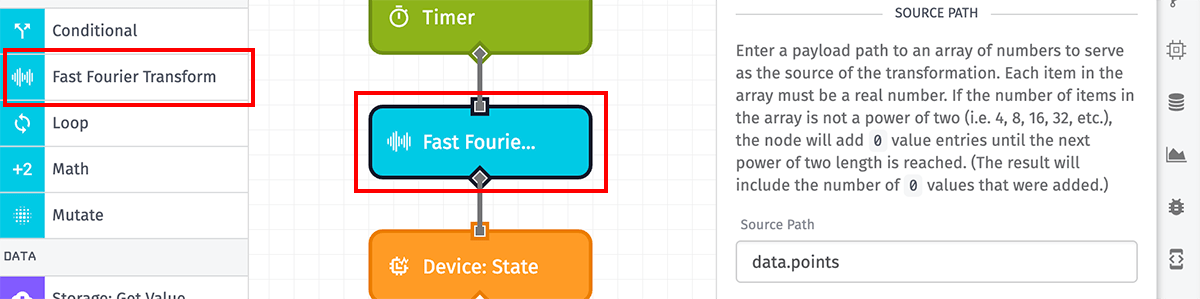
Configuration
The Fast Fourier Transform Node takes three properties for its configuration.
Source Path
First, enter a payload path to an array of numbers on which to run the transformation. Each item in the array must be a real number, or the operation will fail.
Ideally, the length of the array should be a power of 2 — as in, the transformation should be applied to 2, 4, 8, 16, 32, 64, 128, etc. numbers. If the array length is not a power of 2, the node will add 0 values to the array until the next power of 2 length is reached.
Decimal Place Rounding
Next, you may optionally select a decimal place to round the output values to. Options range from No Rounding (full double-precision floating-point) to Ones (whole number). By default no rounding will occur, and the values will be double-precision floating-point numbers.
Result Path
Next, enter a payload path where the result of the transformation should be placed. The result will be an object containing the following properties:
- result: An array containing the calculated frequency domains.
- sampleCount: The length of the provided array of numbers.
- paddingCount: The amount of zeroes added to a non-power-of-two input array length.
Node Errors
There are a handful of common cases where the Fast Fourier Transform Node will throw an error:
- If the value at the source path is not an array.
- If the value is an array but the array is empty.
- If any item within the source array is not a number.
Was this page helpful?
Still looking for help? You can also search the Losant Forums or submit your question there.