Datadog Logs: Write Node
The Datadog Logs: Write Node sends one or more messages to a Datadog instance.
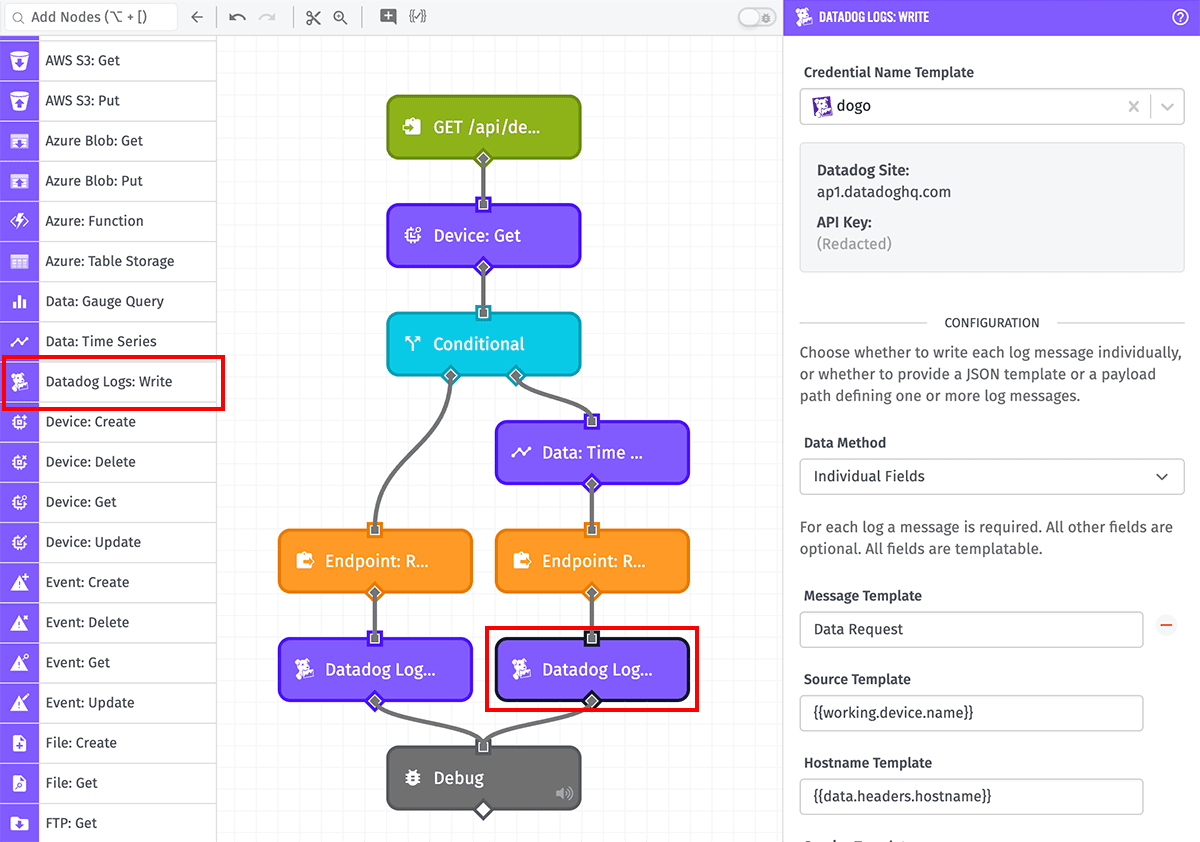
Node Properties
There are three configuration sections for this node.
Datadog Credentials
If using the node in an Application Workflow or Experience Workflow, the node requires a Datadog service credential to authenticate the request.
If using the node in an Edge Workflow, you must enter the following properties, each of which supports string templates ...
- Datadog Site Template: The hostname of where the Datadog instance resides.
- API Key Template: The API key for authenticating requests to the Datadog instance. These can be created within the Datadog platform.
Configuration
Next, choose a Data Method for how to define the message(s) to send to Datadog ...
Individual Fields
When selected, all values to include in each log message are defined separately:
- Message Template: A string template that resolves to the message to send in the log. This field is required.
- Source Template: A string template that resolves to a string corresponding with the "ddsource" property in Datadog.
- Hostname Template: A string template that resolves to the name of the originating host of the log.
- Service Template: A string template that resolves to the name of the application or service generating the log events (for example, "Losant").
- Tags Template: A string template that resolves to a string corresponding with the "ddtags" property in Datadog. This should be a comma-separated list of tags, with each tag in the form
key:value. Multiple values for the same key are supported. For example:You may also provide a string template that points to a JSON object on the payload, whose keys represent tag keys and values are strings representing tag values. Multiple values for the same key are supported by providing an array of values. For example:keyWithManyValues:Value1,keyWithManyValues:Value2,uniqueKey:Value3{
"keyWithManyValues": ["Value1", "Value2"],
"uniqueKey": "Value3"
} - Attributes Template: A JSON template that resolves to an object representing arbitrary key-value pairs to include as additional properties on the log event in Datadog. There are two keys that represent special fields ...
date: If provided and is a valid datetime string, this value will be used as the timestamp of the log event in Datadog instead of the time the message was received. The value must be no more than 18 hours in the past.status: If provided, this value will be used as the status of the log event in Datadog. For example, "error", "warning", or "info".
JSON Template
When selected, provide a JSON template that resolves to a valid Datadog message or array of messages. Each object may include the following properties:
message: (Required) A string for the message to send in the log.source: (Optional) A string that corresponds with the "ddsource" property in Datadog.hostname: (Optional) The name of the originating host of the log.service: (Optional) The name of the application or service generating the log events (for example, "Losant").tags: (Optional) A string or object that corresponds with the "ddtags" property in Datadog.- If a string is provided, it should be a comma-separated list of tags, with each tag in the form
key:value. Multiple values for the same key are supported. For example:keyWithManyValues:Value1,keyWithManyValues:Value2,uniqueKey:Value3 - If an object is provided, keys represent tag keys and values are strings representing tag values. Multiple values for the same key are supported by providing an array of values. For example:
{
  "keyWithManyValues": ["Value1", "Value2"],
  "uniqueKey": "Value3"
}
- If a string is provided, it should be a comma-separated list of tags, with each tag in the form
attributes: (Optional) An object of arbtriary key-value pairs to include as additional properties on the log event in Datadog. There are two keys that represent special fields ...date: If provided and is a valid datetime string, this value will be used as the timestamp of the log event in Datadog instead of the time the message was received. The value must be no more than 18 hours in the past.status: If provided, this value will be used as the status of the log event in Datadog. For example, "error", "warning", or "info".
More information can be found in Datadog's Send Logs API documentation.
Payload Path
When selected, provide a payload path pointing to a value on your payload. That value must be an object or array of objects representing a valid Datadog message, as described in the JSON Template section above.
Result
Optionally, enter a payload path for where to store the result of the node's invocation. If all writes completed successfully, the value placed at the path will be an object of the form:
{ "success": true }
If any of the writes were unsuccessful, the value will be an object of the form:
{
  "success": false,
  "error": {
    "message": "<A message describing the error>"
  }
}
Related Nodes
Was this page helpful?
Still looking for help? You can also search the Losant Forums or submit your question there.